How to find the night sky on a special date
Published on · Reviewed on
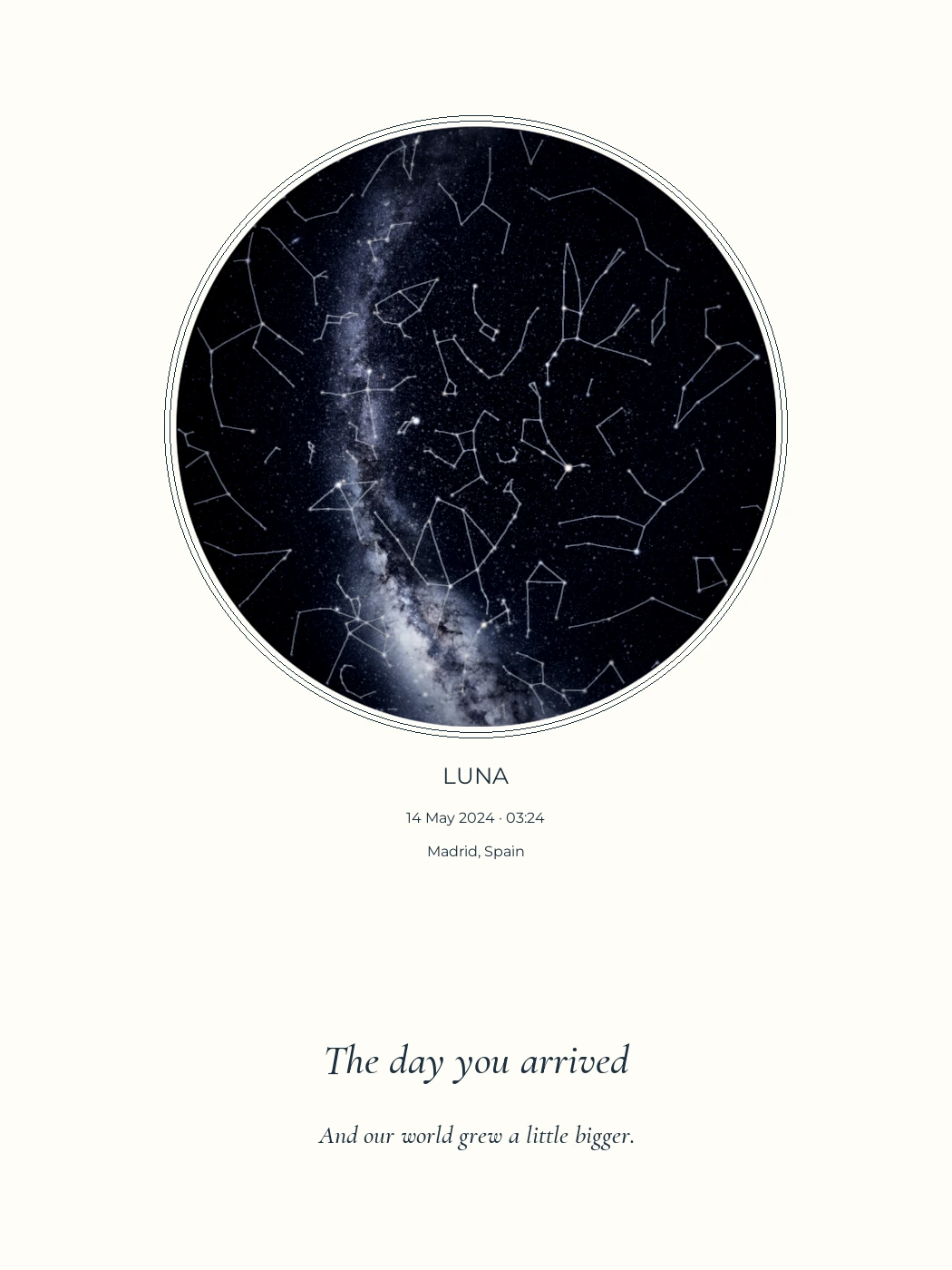
Not a physical print sample.
To calculate the sky for a particular moment, you need its date, location and local time. A star map represents astronomical positions. It does not recover a photograph or show the weather that day.
You remember the day. You may remember the hospital, the station or the street where you met. That gives you a starting point. The time tells us which part of the sky was above that place, so settle it before choosing the colours.
Start with three details
A date alone cannot describe a local sky. Earth rotates, and your position on Earth determines your horizon. Gather these details before opening the designer.
| Detail | Enter | Check |
|---|---|---|
| Date | The month, day and year | That day and month have not been reversed |
| Location | An address, city or place | Choose the right search result, especially when places share a name |
| Time | The local clock time | The time zone and daylight-saving rules for that date |
If a family document supplies the details, read the relevant fields. You do not need to upload a birth certificate or share information that will not appear in the design.
For example, Madrid used UTC+02:00 on May 14, 2024. A local time of 03:24 corresponds to 01:24 UTC. Entering 01:24 in a field asking for local time would select a different moment.
Change the time, then change the place
Consider Madrid on May 14, 2024 at 03:24 and at 09:24. Keep the location, date, orientation and layout the same. Changing only the time changes the stars' positions relative to the horizon: some objects move across the map, while others rise or set.
In this example 09:24 falls in daylight. A calculated chart can still show stellar positions, but that does not mean those stars were visible to an observer under the Sun. Our maps do not simulate daylight, clouds or light pollution.
Compare like with like. A chart with a different projection or north in a different position can look different even when it represents the same instant. Our circular charts put north at the top, east on the left and the point overhead at the centre. The astronomy and credits page explains the calculation and its limits.
One date, three skies
First change only the time. Then compare two places at the same instant. These simplified diagrams show why a date alone cannot describe your sky.
May 14, 2024
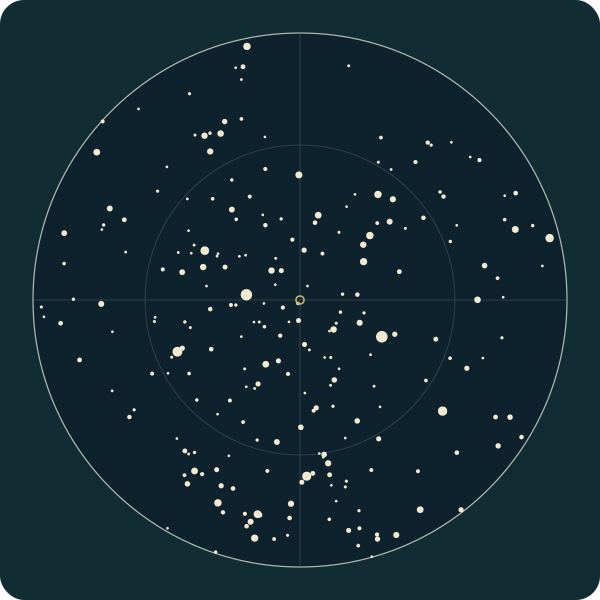
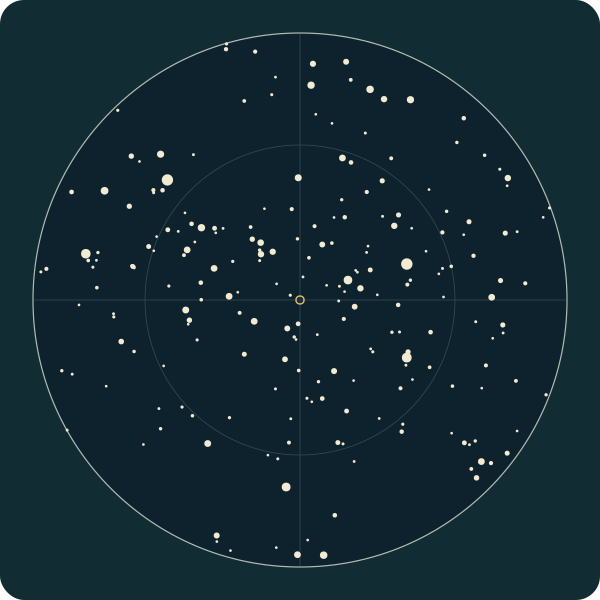
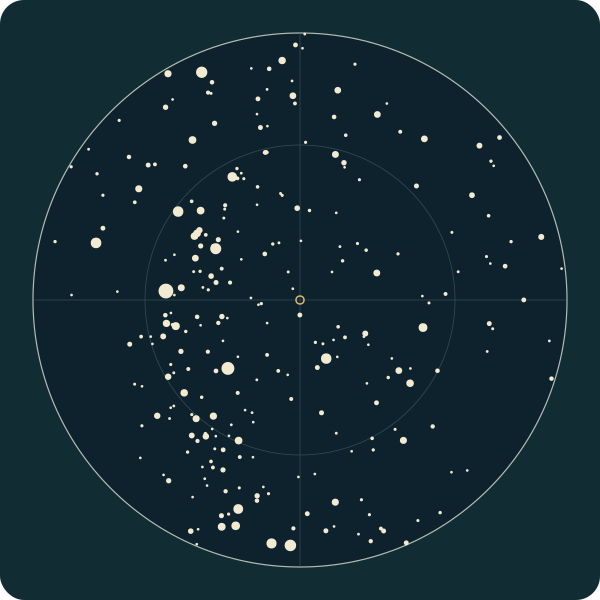
North is up, east is left and the small central ring marks the point overhead. The outer circle is the geometric horizon.
Compare charts 1 and 2: six hours changes both the positions and which stars are above the horizon. Compare charts 1 and 3: the instant is identical, but the place changes the sky.
These diagrams show only catalogue stars with magnitude 4 or brighter. The counts describe this selected dataset, not how many stars a person could see. Daylight, weather and light pollution are not simulated; the daytime charts still contain stars.
Inputs, method and reuse
Calculated by KeptStars Team on October 9, 2026 using the live designer’s fixed J2000 catalogue and stereographic projection. This demonstration omits precession, proper motion, atmospheric refraction, the Moon, planets and Milky Way. It is not a final artwork proof.
- Madrid · starting point
Europe/Madrid · Latitude / longitude: 40.4168, -3.7038
Download this diagram (SVG) - Madrid · six hours later
Europe/Madrid · Latitude / longitude: 40.4168, -3.7038
Download this diagram (SVG) - Sydney · same instant as the first chart
Australia/Sydney · Latitude / longitude: -33.8688, 151.2093
Download this diagram (SVG)
Download inputs and plotted coordinates (JSON)
Download the calculation (JavaScript)
Download spreadsheet tables (CSV)
Chart inputs · CSV · Plotted stars · CSV
Data dictionary and reuse notes (English)
Suggested citation
KeptStars Team (2026). One date, three skies: controlled time and location star-chart examples. HYG v4.1 / David Nash, Astronexus; selection and projection by KeptStars. CC BY-SA 4.0.
keptstars.com/our-sky#three-skies
You may reuse these adapted diagrams with attribution and under the same CC BY-SA 4.0 licence. Credit HYG v4.1 / David Nash, Astronexus, and KeptStars for the selection and projection.
If you do not know the time
Separate an approximate time from an unknown one. “Around nine” is useful information; it is not the same as a record showing 21:07. The wording below the map should preserve that distinction.
KeptStars offers a labelled illustrative time when the real time is unknown. Turning off “I know the time” uses 22:00 local time. The resulting map represents that chosen reference, not the exact instant of a birth.
Daylight-saving changes create another complication. A local clock time can occur twice when clocks go back, or fail to occur when clocks go forward. The designer rejects ambiguous or nonexistent times so that you can check them. Do not resolve the warning by guessing a precise time.
Is this the same as NASA’s birthday image?
No. NASA’s Hubble birthday tool shows an observation associated with a selected day and month. The subject might be a galaxy or a nebula seen through the telescope.
A local star map answers a different question: where celestial objects lie relative to the horizon at a place and time. A Hubble image is not evidence of the whole sky above your town when you were born. Either can make an interesting keepsake when its description explains what it represents.
Turn the details into a design you can check
- Confirm the moment. Check the date, town and local time before styling the map.
- Choose the story. One sky can mark a birth. Two can connect a first meeting and a wedding.
- Read the labels. Names, spelling and the time zone deserve the same attention as the stars.
- Identify the image. The browser preview is a simplified chart. A production proof is a separate stage.
Read what a personalized star map represents if you want to understand the method first. With the details ready, start with a birth map or the personalized star map designer.
What happens if I do not know the time?
Turn off “I know the time.” The designer uses 22:00 local time and labels it as illustrative. That is a chosen reference, not a claim about the unknown exact moment.
Should I enter local time or UTC?
Enter local clock time and the correct time zone for the place. The calculation handles the offset. If a clock change makes the time ambiguous or nonexistent, check the event details before continuing.
Can I choose a daytime event?
Yes. The chart can represent celestial positions during daylight. It does not claim those stars were visible to the naked eye or reconstruct the brightness of the daytime sky.
Sources and notes
Recommendations are from KeptStars’ editorial team. Product details reviewed on October 15, 2026; availability and options may change.